Detect and remediate exposed secrets in your code
Identify exposed secrets before they become a security risk. Findings include clear context and support automated remediation.
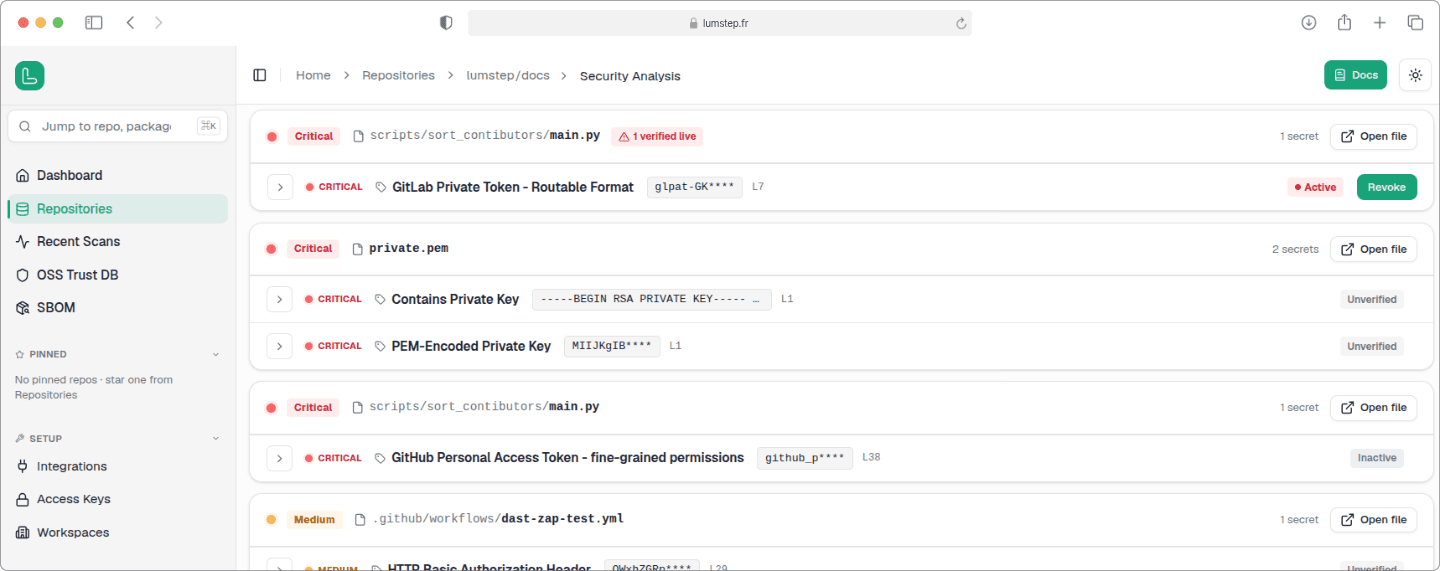
A leaked secret is an open door to your systems
One exposed credential can be all an attacker needs to access cloud resources, compromise sensitive data, or generate significant costs. They don't have to get lucky: automated tools continuously scan repositories for newly exposed secrets.
Early detection with active credential validation
Lumstep flags exposed secrets before they are merged and understands their status. Every finding indicates whether a credential is active, inactive, or could not be verified.
Remove active secrets and trace the rest
Detection is only part of the process. Supported credentials can be revoked from Lumstep with a single action, while other findings include the context needed to locate and rotate the exposed secret quickly.
FAQ about secrets scanning
What is secret scanning?
Secret scanning identifies exposed credentials such as API keys, tokens, passwords, and private keys across your codebase. These secrets can provide direct access to the systems and data they protect.
Does deleting the commit remove a leaked secret?
Deleting an exposed secret from your code is not enough. Credentials should be considered compromised until they have been revoked or rotated.
Can Lumstep find secrets already in my history?
Yes. Scans cover your existing history, not just new commits. So secrets committed long ago, including in files you have since deleted, are still caught.
How does Lumstep detect exposed secrets in my codebase?
Lumstep scans repo for known secret patterns and high-entropy strings, detecting API keys, tokens, private keys, credentials, and more. Pattern matching, entropy analysis, and validation logic help identify real secrets while minimizing false positives. Sensitive values that could create security risk are surfaced for review.
What happens when Lumstep finds a live secret?
Where supported, Lumstep provides one-click revocation from the web interface. For remaining findings, the affected file and location are provided to simplify credential rotation.
How does Lumstep reduce false positives?
Findings are verified before they reach you, and each one is labeled with its status (active, inactive, or unverified) so your team spends time on the secrets that are actually a risk.
Is it safe to give Lumstep access to my code?
Yes. Scans run in isolated, per-tenant sandboxes, your data is encrypted with keys unique to your organization, and nothing is shared across customers.
Scan your history for exposed credentials
Free early access. Detect exposures across your history immediately.